
Advanced COGS settings
Set a cost per variant and per country, with a start date so a new price does not rewrite past profit. Enter the supplier's currency, converted at each order's daily rate, and quantity tiers.
See how COGS works →Shopify profit app
Juicy is a profit tracker for Shopify that brings COGS, shipping, fees, expenses, and multi-touch ad attribution into one clear dashboard, so you always know what you actually keep. See how it compares with other Shopify profit apps.

Animated preview of the Juicy Profit Analytics app: profit dashboard with a visual cost breakdown, pinned KPI cards for net margin, ad spend, blended ROAS and break-even ROAS, Meta and Google campaign profit, country performance and product performance.
Revenue can look healthy while hidden costs quietly eat the margin. Juicy connects the full cost stack behind every order.
Transaction fees include Shopify Payments currency conversion fees, so selling in multiple currencies shows its true cost.
| Order | Source | Gross revenue | Transaction fees | Payment | COGS | Gross profit | Gross margin |
|---|---|---|---|---|---|---|---|
| #4246 | $371.07 | $23.57 | KKlarna Pay Later | $143.22 | $204.27 | 55.1% | |
| #4245 | $231.57 | $9.97 | Mastercard | $79.98 | $141.61 | 61.1% | |
| #4244 | $324.57 | $21.33 | KKlarna Pay Later | $101.37 | $201.86 | 62.2% | |
| #4243 | $231.57 | $13.38 | AMEXAmerican Express | $79.98 | $138.20 | 59.7% | |
| #4242 | $231.57 | $10.48 | PPayPal | $79.98 | $141.10 | 60.9% | |
| #4241 | $324.57 | $13.25 | VISAVisa | $101.37 | $209.94 | 64.7% | |
| #4240 | $324.57 | $13.25 | VISAVisa | $101.37 | $209.94 | 64.7% | |
| #4239 | $324.57 | $13.25 | VISAVisa | $101.37 | $209.94 | 64.7% |
One profit operating system
One Shopify profit app for product cost, shipping, fees, and the ads behind each order.
Set shipping rules by shipping method, country, weight, or quantity.
Set a cost per variant and per country, with a start date so a new price does not rewrite past profit. Enter the supplier's currency, converted at each order's daily rate, and quantity tiers.
See how COGS works →Add recurring overhead, one-time costs, pick and pack fees, and extra income sources.
Match orders from Meta, Google, TikTok, Snapchat, Pinterest, Microsoft Ads, and AppLovin to the campaign that created them, then judge the result by profit.
05See every order with its cost breakdown, source, and profit.
06Combine the stores you connect into one view. Each store needs its own subscription.
07✦ NewAsk Shopify's built-in AI about your profit, ROAS, and ad spend, powered by Juicy's data, no extra tab needed.
08✦ NewSee units sold, gross sales, and profit per product and variant, for any date range: today, last 30 days, or custom.
09✦ NewSee units on hand, recent sales pace, and days of inventory per variant, so restocks and dead stock are visible before they cost you sales.
10✦ NewSee which products customers actually buy together, ranked by statistical lift, so you know which pairs are genuine bundle opportunities.
11✦ NewSubtract what your agency charges, as a share of ad spend, a fixed retainer, or both, so profit includes what your marketing really costs.
12✦ NewSee orders, gross profit, and ad spend for every country, so each Shopify Market shows its real profit after ads.
Built for accuracy
Set costs the way you actually work: per product, per country, per shipping method, and across every store you run.

Cost of goods
Set COGS exactly the way your business works, not the way a generic tool assumes it does. Juicy supports complex cost structures across products, markets, and time.

Shipping costs
Shopify does not record what you paid to ship an order. You set rules by shipping method, and Juicy applies that cost to the order.
Ad attribution
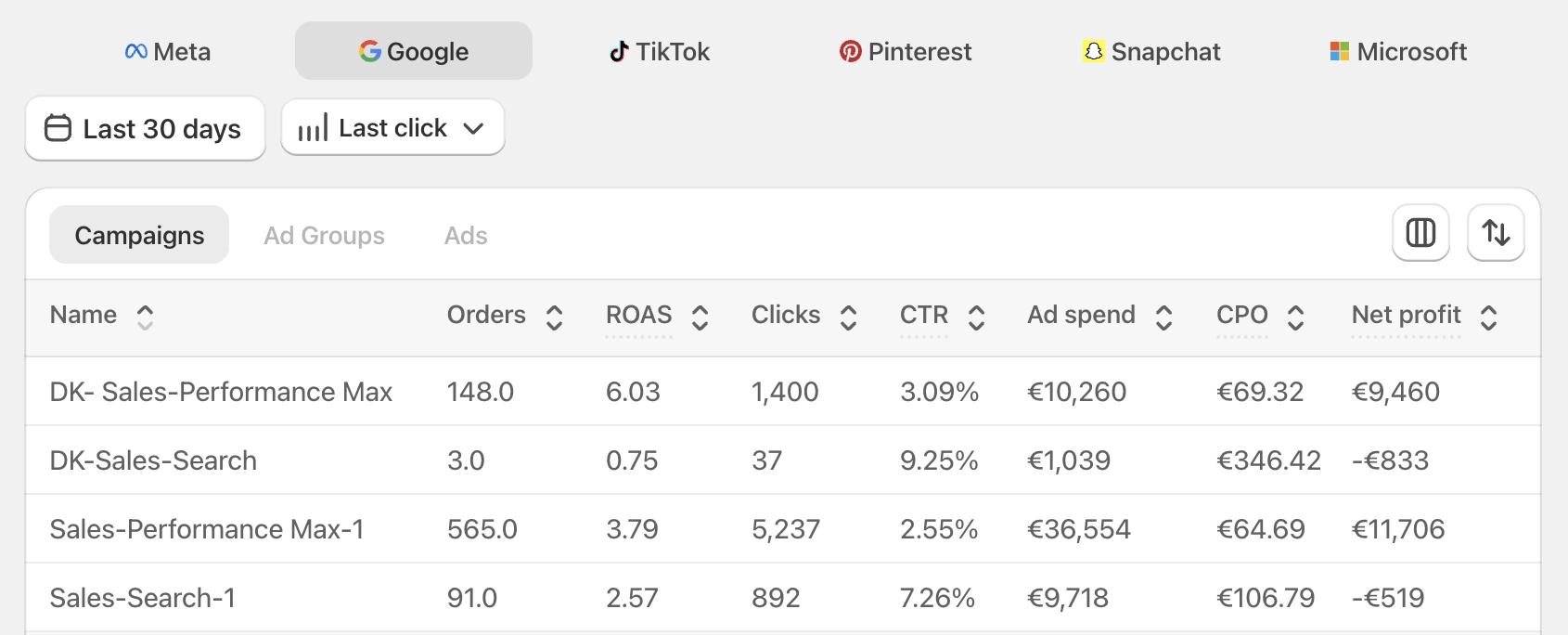
Juicy attributes orders to Meta, Google, TikTok, Snapchat, Pinterest, Microsoft Ads, and AppLovin from the URL parameters on your ads. It also reads ad spend and performance from those platforms, including Meta. Choose the model that matches how your customers buy.
Multi-store
See sales, costs, ad spend, and profit for those stores in one view, or open a single store. Each store needs its own Juicy subscription. The combined view does not add an extra store onto one plan.
Dated product costs
When a supplier price changes, set the new product cost and the date it starts. Orders before that date keep the old cost, so profit from those orders stays as it was.
A different cost by country or quantity still works. The start date decides which cost an order uses. See how to set up product costs.
An order on Feb 20 keeps $8.00. An order on Mar 4 uses $9.50.
The numbers
Pick a date range and see sales, the costs you have set, and the profit that is left. Use the profit tracker for Shopify on one store, or on every store Summarize all shops combines.
How profit margin is calculated →Break-even ROAS is the return your ads need before ad spend uses up the profit. Juicy shows that line next to the ROAS you actually got.
Work out break-even ROAS from an average order →Launch fast
Juicy keeps setup practical: install the app, connect your ad platforms, add cost rules, and start reading real profit instantly.
Install on ShopifyAdd the Shopify app and open your clean profit workspace.
Sync Meta, Google, TikTok, Snapchat, Pinterest, Microsoft Ads, AppLovin, and UTM data.
Set COGS, shipping, PayPal fees, taxes, expenses, and historical changes.
Find winning ads and products with margin-aware reporting.
Ask an assistant
Connect an assistant and ask about profit, orders, and campaigns in a normal chat. It can also update costs. This works with ChatGPT, Claude, Grok, and other assistants, on every plan, including Free. See how to connect.

Merchant proof
Finally I can see my real profit clearly. This app made decision-making so much easier.
We replaced multiple tools with this. Saves time and gives better clarity.
Simple pricing
Free plan
$0
Starter
$29 / month
Advanced
$49 / month
Switching from Triple Whale, TrueProfit or GoProfit? See Juicy vs Triple Whale, Juicy vs TrueProfit, Juicy vs GoProfit, or the best Shopify profit apps roundup.
Guides
Short guides for product cost, shipping, fees, taxes, and how margin is calculated.
Enter product costs, including a different cost by quantity, from a supplier quote.
Match orders by shipping method and country, then set flat, weight, or quantity costs.
PayPal's own processing fee versus Shopify's third-party payment fee.
Tax settings sync from Shopify. Change them there, and new orders pick them up.
How the EU customs duty and the €2 handling fee are included in profit.
The profit margin formula, and what you keep after product cost, shipping, fees, and ads.
Gross profit per order, the ROAS you need to break even, and the most you can pay to acquire an order.
Fees, taxes, shipping, ads, and checkout changes that affect profit. The newest week is at the top.
FAQ
Juicy is free for up to 50 orders a month. Starter is $29/month for up to 500 orders. Advanced is $49/month. Every plan includes the same features.
The free plan covers up to 50 orders a month and includes the same features as Starter and Advanced.
Only the number of orders. Free covers up to 50 orders a month, Starter covers up to 500, and Advanced is for stores past that. The features are the same on every plan.
Product cost, shipping, payment fees, taxes, expenses, agency fees, and third-party logistics fees. Transaction fees include Shopify Payments currency conversion fees, so selling in multiple currencies shows its true cost.
You set rules by shipping method. A rule can also depend on country, weight, or quantity.
Yes. Set the date a new cost starts. Orders before that date keep the old cost, so past profit stays as it was.
Juicy supports Meta, Google, TikTok, Snapchat, Pinterest, Microsoft Ads, and AppLovin. AppLovin orders are matched with the AppLovin URL parameters you add to each ad.
Add Juicy's URL parameters to your ads. Then choose how credit is shared: first click, last click, last click per platform, linear, position based, or time decay.
Juicy reads ad spend and performance from Meta. An optional Conversions API connection is coming. It is not available yet. The privacy policy describes that optional connection.
URL parameters tie an order to an ad. Profit, product cost, and shipping still work if you skip them.
Juicy processes your Shopify store data, the costs you add, and ad attribution so it can show profit. The privacy policy and data processing terms describe what that covers.
No. An assistant sees your Juicy data only after you connect it. You can disconnect it at any time.
Yes. Connect ChatGPT, Claude, Grok, or another assistant with the Juicy MCP connector. Ask about profit, orders, and campaigns. The assistant can also update costs. It is included on every plan, including Free.
Yes. Ask Sidekick about profit and ad spend. Sidekick uses your Juicy data for that answer.
Yes. Summarize all shops combines the stores you connect into one view. You can still open each store on its own.
No. Each store needs its own subscription. Summarize all shops only combines stores that already have one.
Stop guessing from revenue. Start making decisions from margin.
Install Juicy on Shopify